Professional Multi-Purpose Academy Pod - Quick Reference Page
This quick reference page provides a summary of the specifications of this topology. For a complete reference including installation details, please refer to the Professional Multi-Purpose Pod Planning and Installation Guide
The CCNPv8 courses supported using the Professional Multi-Purpose Academy Pod require NETLAB+ VE 20.3.1 or greater.
| Topology | Supports | Documentation |
|---|---|---|

|
Planning and Installation Guide |
Lab Topology
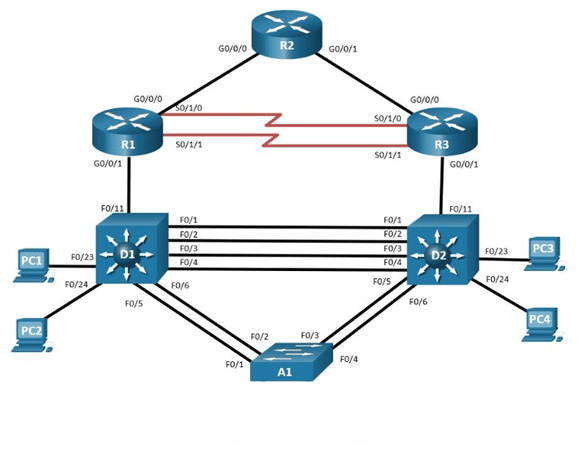
The NETLAB+ Professional Multi-Purpose Academy Pod (PMAP) is a versatile pod, which includes 3 routers, 3 switches, and 4 PCs. The tables below indicate the recommended devices, based on the hardware lists provided by Cisco.
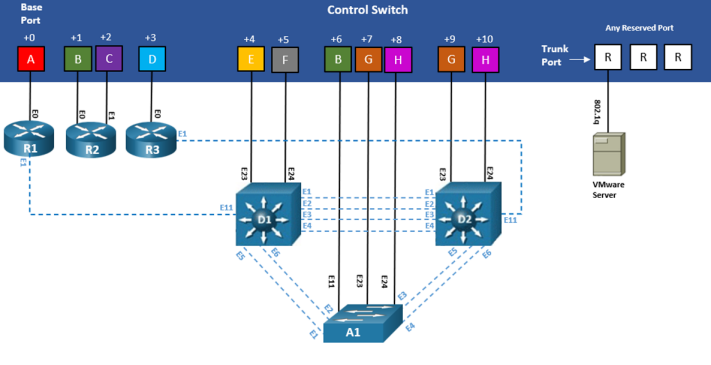
All NETLAB+ topologies with lab switches and Virtual Machines require additional switch configuration tasks for successful operation. The Professional Multi-Purpose Academy Pod requires switch configuration commands on control switch ports D1, D2, and A1.
Lab Device Requirements
Lab devices are part of the topology and users can interact with them either directly through the console or network. The lab device requirements vary for the Professional Multi-Purpose Academy Pod, depending on the Cisco equipment you plan to use.
Hardware compatibility with NETLAB+ does not guarantee the compatibility of labs. Please check the Academy curriculum, NDG pod guides, and lab support pages for specific hardware and IOS requirements.
Other equipment may work if it is supported by NETLAB+ and can meet the minimum requirements for feature sets, interfaces, IOS, RAM, and Flash.
| Router/Switch | Recommended Models | Minimum DRAM | Minimum Flash | Minimum IOS | Feature Set/Technology Packages |
|---|---|---|---|---|---|
| R1 |
Cisco 4221 Cisco 4321 Cisco 4331 |
Cisco 4 GB Cisco 4 GB Cisco 4 GB |
Cisco 8 GB Cisco 4 GB Cisco 4 GB |
Fuji - 16.9.4 | IPBase, Security |
| R2 |
Cisco 4221 Cisco 4321 Cisco 4331 |
Cisco 4 GB Cisco 4 GB Cisco 4 GB |
Cisco 8 GB Cisco 4 GB Cisco 4 GB |
Fuji - 16.9.4 | IPBase, Security |
| R3 |
Cisco 4221 Cisco 4321 Cisco 4331 |
Cisco 4 GB Cisco 4 GB Cisco 4 GB |
Cisco 8 GB Cisco 4 GB Cisco 4 GB |
Fuji - 16.9.4 | IPBase, Security |
| D1 |
Cisco WSC3650+24TS-E |
4 GB | 2 GB | Fuji - 16.9.4 | IP Services |
| A1 |
Cisco WS-C2960+24TC-L |
128 MB | 64 MB | 15.0.2-EZ(ED) | LAN BASE |
| D2 |
Cisco WSC3650+24TS-E |
4 GB | 2 GB | Fuji - 16.9.4 | IP Services |
Router Interfaces
The NETLAB+ interface name translation feature is supported on this pod type. This may influence the selection of modular interface cards and slot placement within the router.
Virtual PC Support
Remote PCs are implemented by integrating with 3rd party virtualization products. The NETLAB+ documentation library includes several guides with extensive detail on the implementation of virtualization with your NETLAB+ system.
The following operating system choices are typical based on the curriculum. These choices are not mandatory; you can make substitutions provided that:
- Your choice of NETLAB+ supported virtualization product supports the operating system (as a guest).
- Your choices are compatible with the curriculum.
Only virtual machines are supported on this topology. Standalone PCs are not supported.
The Professional Multi-Purpose Academy Pod supports four (4) virtual machines.
| Virtual Machine | Software | Version | Source |
|---|---|---|---|
| PC1 | Windows | 10 Pro (64-bit) | Azure Dev Tools for Teaching |
| PC2 | Windows | 10 Pro (64-bit) | Azure Dev Tools for Teaching |
| PC3 | Windows | 10 Pro (64-bit) | Azure Dev Tools for Teaching |
| PC4 | Windows | 10 Pro (64-bit) | Azure Dev Tools for Teaching |
1See the planning and installation guide for details.
Control Device Requirements
Control devices provide internal connectivity, console access, and managed power. Control devices are dynamically managed by NETLAB+ and are not accessible or configurable by end users.
- Control switches provide connectivity between devices in the pod.
- Access server lines provide console connections to lab equipment.
- Power Distribution Units provide managed electrical power, allowing NETLAB+ and users to turn lab equipment on and off.
Control Device Requirements for the Professional Multi-Purpose Academy Pod
| Control Device Resource | Quantity Required |
|---|---|
| Control Switch | 11 Consecutive Ports 1 Reserved Port (VMware) |
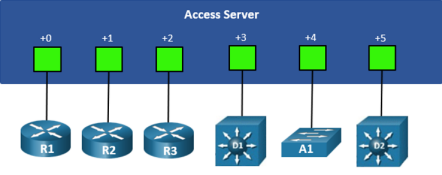
| Access Server | 6 Lines |
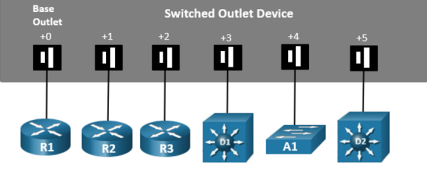
| Power Distribution Units | 6 Outlets |
The Professional Multi-Purpose Academy Pod requires 11 consecutive ports on a control switch.
The Professional Multi-Purpose Academy Pod requires 6 ports on an access server.
The Professional Multi-Purpose Academy Pod requires 6 outlets on a power distribution unit (also known as switched outlet device).