Palo Alto Firewall Essentials GW Pod and Firewall Essentials FE Pod - Quick Reference Page
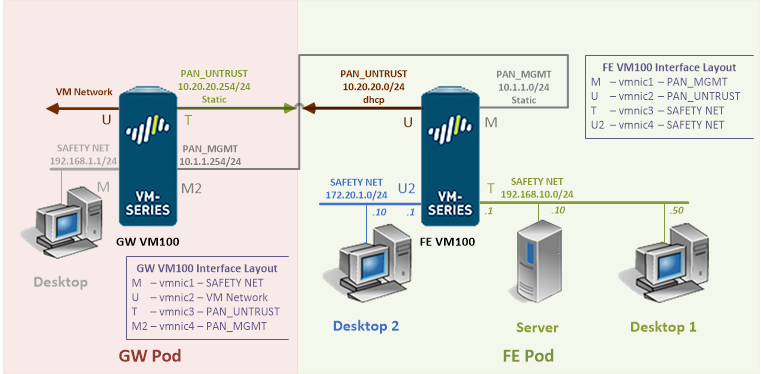
This quick reference page provides a summary of the specifications of these topologies. For a complete reference including installation details, please refer to the Palo Alto Firewall Essentials Pod Planning and Installation Guide .
Want to watch the installation performed? Please see the video version of the installation guide.
The Palo Alto Networks Academy Firewall Essentials lab set is designed to have Internet access.
Due to this requirement, 2 topologies are needed. The Firewall Essentials Gateway pod (GW) is designed to provide Internet access to underlying Firewall Essentials pods (FE) per host.
To install and use these pods on your NETLAB+ system, you are required to indicate your acceptance of the NETLAB+ Pod Internet Access and Use Agreement.
Your system will not be enabled to support Palo Alto Networks Firewall Essentials pods until the agreement is accepted.
| Topologies | Supports | Documentation |
|---|---|---|
 
|
Palo Alto Firewall Essentials Planning and Installation Guide |
You may request virtual machine templates for the Palo Alto Firewall Essentials FE Pod and the Fire Essentials GW Pod from CSSIA.
Lab Topologies
Lab Topology - GW Pod
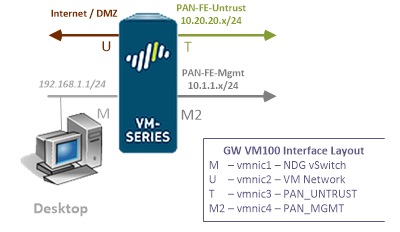
Virtual Machines - GW Pod
The virtual machines in the pod are listed in the table below.
| Virtual Machine |
|---|
| GW Firewall |
| Desktop |
Lab Topology - FE Pod
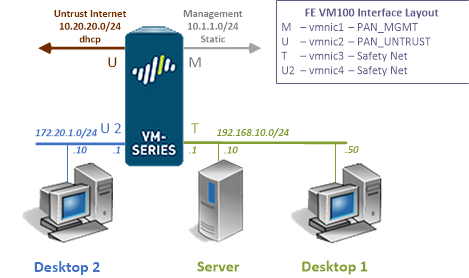
Virtual Machines - FE Pod
The virtual machines in the pod are listed in the table below.
| Virtual Machine |
|---|
| FE Firewall |
| Desktop1 |
| Desktop2 |
| Server |
Installation Video
For a step-by-step look at the installation process, see the video version of the installation guide.
Virtual Machine Templates
The virtual machines are made available as Open Virtualization Format (OVF) or Open Virtualization Archive (OVA) files. These files are available for download from EPNC (Education Pathway National Center).
To request access to the preconfigured virtual machine templates from EPNC:
- Go to the CSSIA Resources page: https://www.caeepnc.org/cssiaresources/
- Select CSSIA VM Image Sharing Agreement.
- Complete and submit your access request by following the instructions on the request form.
- EPNC will provide, via email, password-protected download links. Access to the download links is provided only to customers who are current with their NETLAB+ support contract and are participants in the appropriate partner programs (i.e., Cisco Networking Academy, Red Hat Academy, and/or Palo Alto Networks Cybersecurity Academy).
- Once all virtual machines have been downloaded, they can be deployed following the steps in the appropriate pod installation guide. Each virtual machine is deployed individually.